

Moguri user guide
Install Moguri, start your first session, then use the guides for everyday work. The Settings reference covers every option in detail.
Start here
Guides
Task guides for everyday work, written for this website.
Reference
Published unchanged from Moguri's own documentation. When a guide and the reference disagree, the reference wins.
Session controls
The desktop app, terminal UI and CLI connect through the SDK to one local service. The service keeps session history and decides what tools may do.
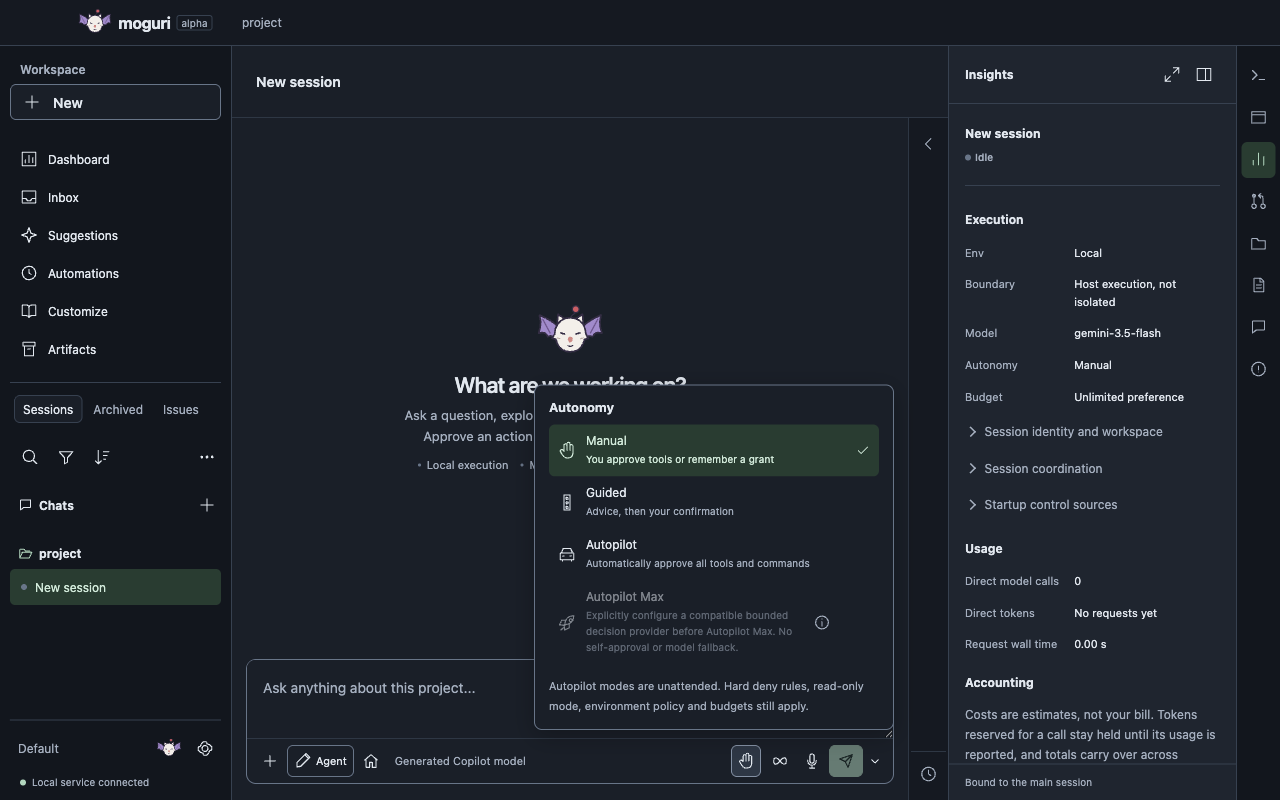
Each session has four controls: Env, Model, Autonomy level and Budget. A new session starts with Local execution, no model until you sign in or configure a local one, Manual autonomy and an Unlimited budget. Global, profile and project settings can change those defaults.
- Local
- Runs on your Mac. Workspace and tool permissions apply, but Local isn't isolated from the rest of the system.
- Remote
- Runs the agent, model calls and commands on an SSH machine you configure. SSH alone isn't a sandbox.
- Sandbox
- Runs in a SendBox VM after a separate, reviewed setup. If containment isn't available, work stops instead of moving to Local.
What's available
Moguri 0.32.0-alpha.1 is an alpha for macOS on Apple silicon. Implemented capabilities records what works, and the roadmap lists what's still missing. The product vision describes much more than the app does today; don't read it as a feature list.
Common questions
Can I use a local model?
Yes. Start an OpenAI-compatible server yourself, such as Ollama or llama.cpp, then add its endpoint and declare the model's limits. Moguri never scans hosts, downloads weights or picks a model for you. See Local models.
Is remote execution sandboxed?
No. Remote runs on the SSH machine you chose, with that machine's access. Sandbox containment needs the separate Sandbox environment and its reviewed setup. See permissions and execution.
Does Moguri work on Intel Macs, Linux or Windows?
Not as a release. Builds exist only for macOS on Apple silicon.
Are the screenshots real?
Yes. They come from Moguri's own automated capture test, which runs the 0.32.0-alpha.1 desktop app with generated projects, conversations and models. The terminal preview on the homepage is an illustration.
About these docs
The installation guide, the Settings reference, implemented capabilities, the roadmap and the product vision are published unchanged from Moguri's source repository at commit b686ddc. That repository isn't public yet, so references to files that only exist there appear as plain text with a dotted underline. The task guides are written for this website and link to the reference for full detail.